PMS Integration Guide
This guide covers how to integrate Loxa Product Protection into a PMS (Practice Management System) checkout flow. It is aimed at PMS developers building the integration into their system.
For full API reference including request/response schemas, see PMS Insurance Quote and PMS Orders.
Quick Integration Overview
At a high level, integrating Loxa into a PMS involves:
- Call
POST /pms/insurance-quotewith all basket items when the insurance modal is triggered - Display insurance options (add-on and/or inclusive) from the response
- Capture compliance confirmations (customer 18+, policy documents, demands & needs) and vulnerable customer information
- Submit the order via
POST /orderswith insurance codes, compliance metadata, vulnerable customer details, and product metadata - Cancel orders using the Cancellations endpoint when needed
Use our codes
Never invent insurance codes. Always use the code values returned from the insurance quote endpoint.
PMS Settings
Your PMS will need a Loxa settings section (typically in global settings) where the user can:
- Add their API key
- Toggle insurance on/off
What's Insurable
- Glasses bundles only: frame + lenses + any extras (e.g. coatings, tints)
- Not insurable: standalone lenses, accessories, sight tests — no banner shown, no section in modal
- Insurance is priced on the full bundle total including VAT
- Insurance premium is inclusive of Insurance Premium Tax and is not subject to VAT
Banner
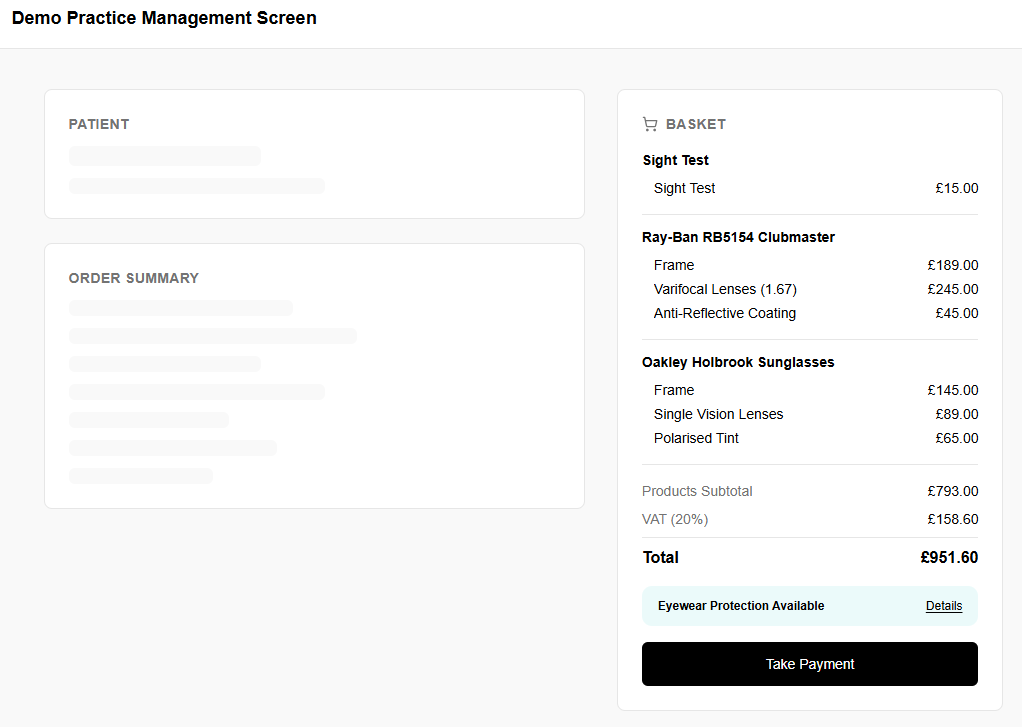
- Displayed in the basket/checkout for any order containing at least one insurable item
- Positioned above the Take Payment (or equivalent) button
- Static copy, never changes: "Eyewear Protection Available" "Details"
- Clicking anywhere on the banner opens the modal
- If the basket contains only non-insurable items, the banner does not appear and Take Payment does not intercept
Insurance Modal
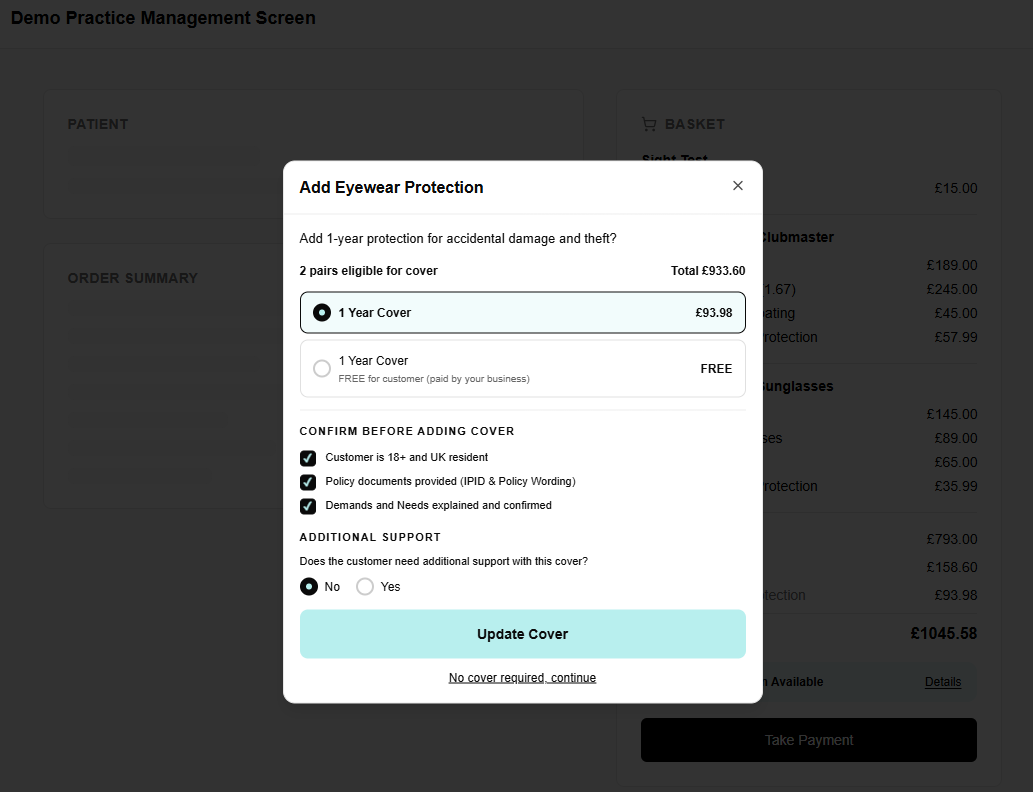
When the banner is clicked — or when Take Payment is clicked and the modal has not been submitted yet — the modal opens. At this point, call the insurance quote endpoint to get pricing for the basket.
Requesting a Quote
Eyewear Category Override
PMS integrations currently support eyewear only. You must set category_override to "Eyewear" on every item in the request.
Send all insurable basket items to POST /pms/insurance-quote:
{
  "items": [
    {
      "item_id": "pair-1",
      "sku": "FRAME-OAK-001",
      "product_title": "Oakley Holbrook Sunglasses",
      "product_price": 299.99,
      "category_override": "Eyewear"
    },
    {
      "item_id": "pair-2",
      "sku": "FRAME-RAY-002",
      "product_title": "Ray-Ban Wayfarer",
      "product_price": 179.99,
      "category_override": "Eyewear"
    }
  ]
}
The response categorises each item and returns totals for the entire basket with both add-on (customer pays) and inclusive (retailer pays, free to customer) pricing. The user is offered a single choice to insure the whole basket — not per-item selections.
Items that are not insurable come back with insurable: false and a reason — they are excluded from the totals but don't cause the request to fail.
When to re-call the insurance quote
- When items are added to or removed from the basket
- When an item is edited (e.g. lens change) — the price may have changed, so the insurance quote needs refreshing
Displaying Options
The insurance quote response includes a totals array with basket-level pricing. The user chooses one option for the entire basket:
| Option | Field | Who Pays | Display |
|---|---|---|---|
| Add-on | totals[].add_on_total |
Customer | [term_years] Year Cover £[total price] |
| Inclusive | totals[].inclusive_total |
Retailer | [term_years] Year Cover FREE |
Use totals[].term_years for the term, and totals[].add_on_total or totals[].inclusive_total as the price shown in the modal.
First Open
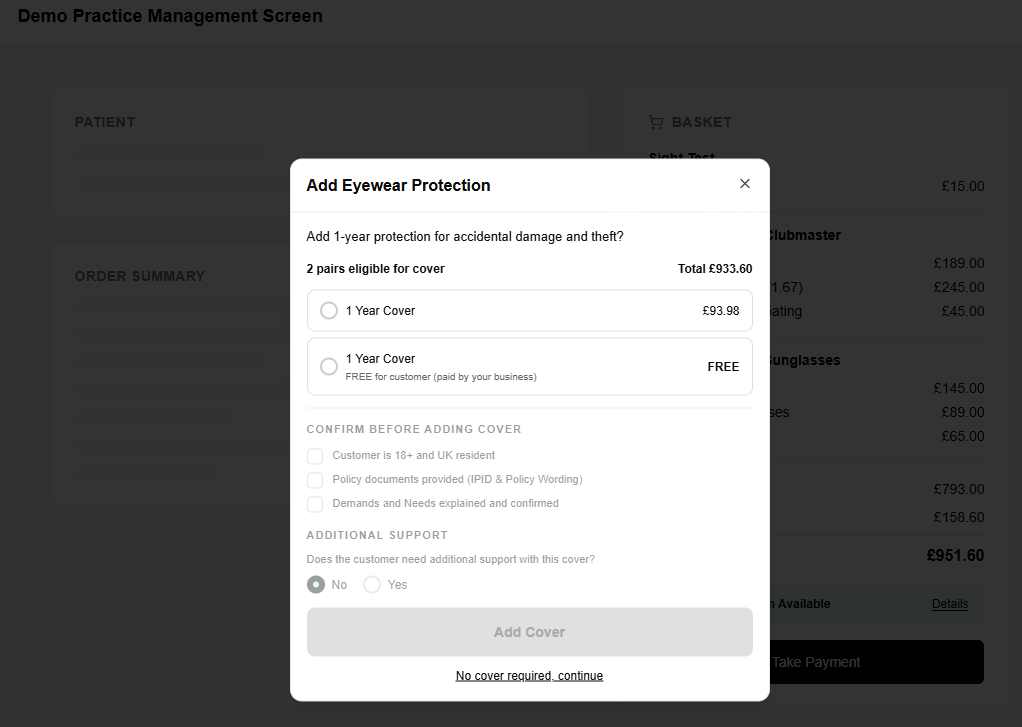
- Default state: no selection
- Number of eligible pairs shown and their total value (inc VAT)
- Two radio options:
- [term_years] Year Cover £[price]
- [term_years] Year Cover FREE — free for customer (paid by your business)
- "Add Cover" CTA is inactive until all three compliance checkboxes are ticked (see below)
- "No cover required, continue" link is always active and also counts as a submission, clearing the Take Payment intercept
Free cover notice
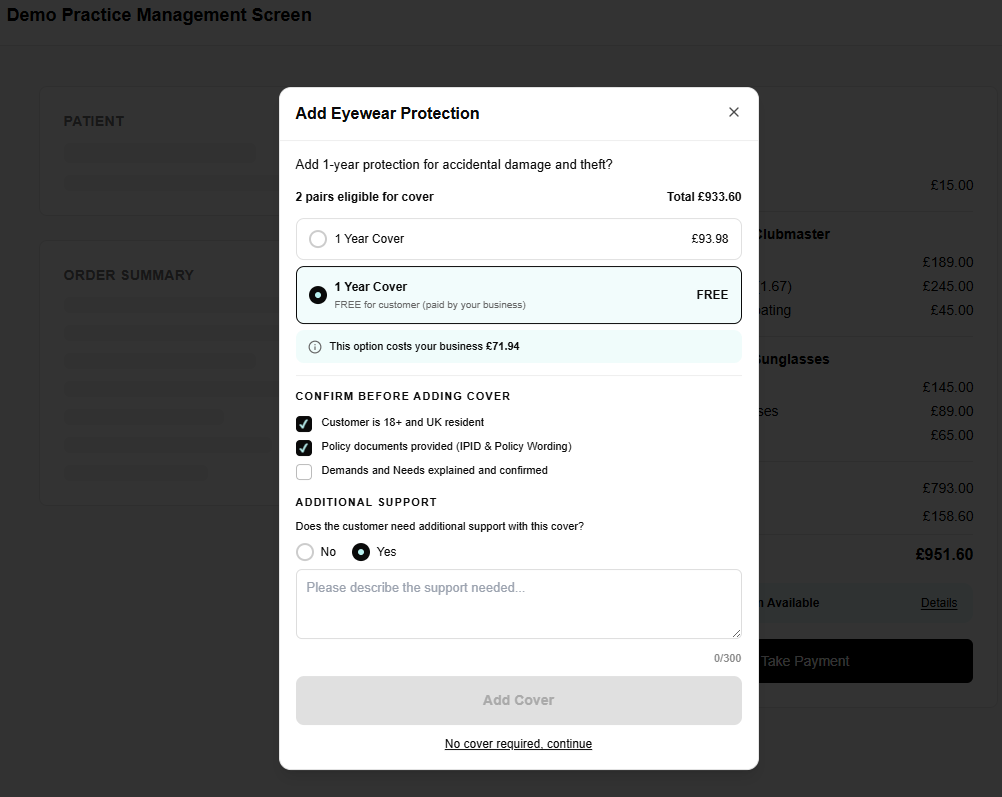
If the "FREE for customer (paid by your business)" option is selected, an inline notice appears below the selection: (i) This option costs your business £[total]. Use the inclusive_total from the totals array for this figure — it represents the cost to the merchant.
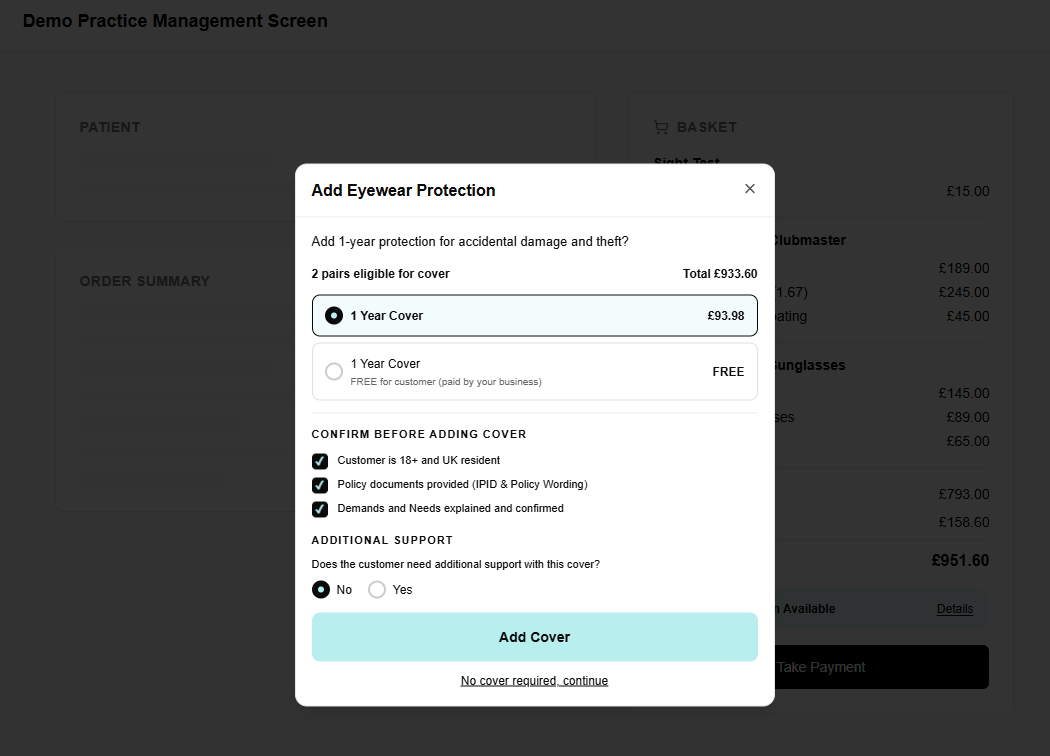
Compliance Confirmations
The modal must capture three compliance confirmations before the user can proceed. These are required fields on the order and must be sent as order-metadata:
- Customer is 18+ and UK resident →
customer-over-18-confirmed - Policy documents provided (IPID & Policy Wording) →
policy-documents-provided - Demands and Needs explained and confirmed →
demands-and-needs-confirmed
The "Add Cover" CTA should remain inactive until all three checkboxes are ticked.
Vulnerable Customer Support
The modal must also capture whether the customer needs additional support. These are required fields on the order and must be sent on the customer object:
- "Does the customer need additional support with this cover?" — No (default) / Yes →
customer-support-needed - If Yes is selected, a free text field appears below: "Please describe the support needed..." (maximum 300 characters) →
customer-support-details
The vulnerable customer question does not affect the CTA activation — the user can proceed regardless of the answer.
Return Visit
- Shown any time the modal is reopened after having been submitted once
- CTA label changes from "Add Cover" to "Update Cover" after first submission
- Previous insurance selections pre-populated
- Confirm section visible but pre-completed — user does not need to re-confirm
- "No cover required, continue" link still present
Item Deletion
- If an insured item is removed from the basket, its associated insurance is automatically removed
- If the item is re-added, insurance state resets to default (No Cover)
- If an item in the basket can be edited (e.g. frame or lens change), insurance should be removed on edit and the user prompted to make a new selection — this ensures the insurance price always reflects the current bundle price
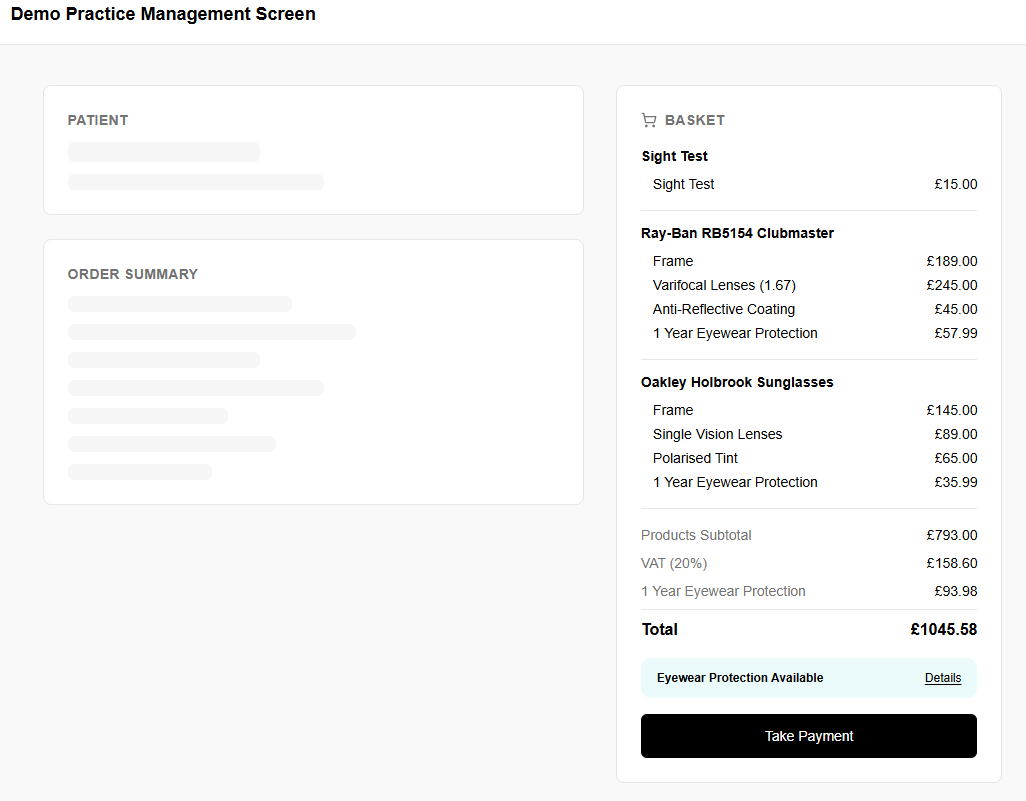
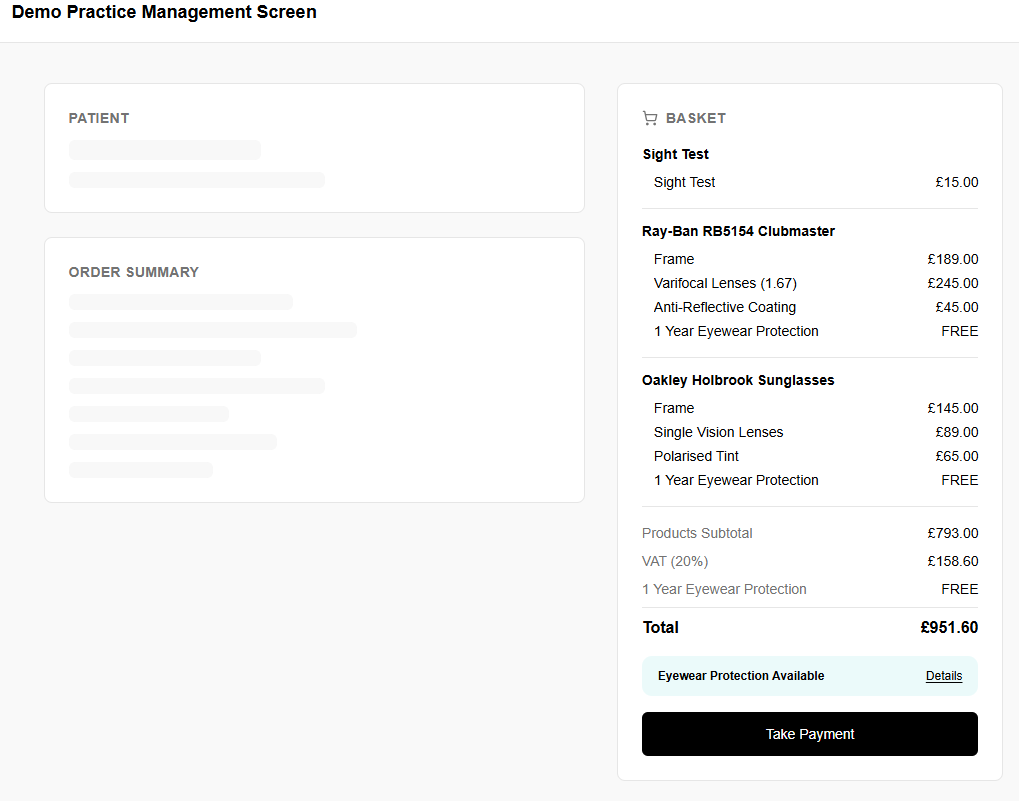
Basket — Insurance Selected State
Per Insurable Item
- "1 Year Eyewear Protection" appears as a line item within the glasses bundle, directly below the other components
- Priced individually per item
Totals Block
- Products Subtotal: sum of all products, excluding insurance
- VAT (20%): applied to products only
- 1 Year Eyewear Protection: separate line below VAT, showing combined total of all insurance selected
- Total: products subtotal + VAT + Loxa Protection
VAT Treatment
Insurance is not included in the VAT calculation. Insurance premium is inclusive of Insurance Premium Tax and is not subject to VAT.
Take Payment — Submitting the Order
Take Payment Intercept
- If the modal has never been submitted this session, clicking Take Payment intercepts and opens the modal before payment proceeds
- If the modal has been submitted at least once (via the CTA or "No cover required"), clicking Take Payment proceeds without interruption
Submitting to Loxa
When payment is taken, submit the order to POST /orders. Although the user makes a single basket-level choice (add-on or inclusive), the order must include a transaction per insured item — use the per-item insurance_code and premium from the insurance quote response's quotes array.
{
  "order": {
    "order-id": "PMS-ORD-2026-001",
    "order-date": "2026-04-09",
    "order-number": "12345",
    "order-metadata": {
      "customer-over-18-confirmed": true,
      "policy-documents-provided": true,
      "demands-and-needs-confirmed": true
    },
    "transactions": [
      {
        "transaction-id": "pair-1",
        "product-id": "OAK-HOLBROOK-001",
        "product-name": "Oakley Holbrook Sunglasses",
        "product-price": 350.00,
        "insurance-price": 33.99,
        "loxa-insurance-code": "E1AA-20260409-45",
        "term": 1,
        "quantity": 1,
        "product-metadata": {
          "brand": "Oakley",
          "model": "Holbrook",
          "colour": "Matte Black",
          "components": ["Oakley Holbrook Frame", "Single Vision Lenses", "Polarised Tint"]
        }
      },
      {
        "transaction-id": "pair-2",
        "product-id": "RAY-AVIATOR-002",
        "product-name": "Ray-Ban Aviator Classic",
        "product-price": 220.00,
        "insurance-price": 21.99,
        "loxa-insurance-code": "E1AA-20260409-45",
        "term": 1,
        "quantity": 1,
        "product-metadata": {
          "brand": "Ray-Ban",
          "model": "Aviator Classic",
          "colour": "Gold",
          "components": ["Ray-Ban Aviator Frame", "Prescription Lenses"]
        }
      }
    ],
    "customer": {
      "first-name": "Jane",
      "last-name": "Doe",
      "email": "jane.doe@example.com",
      "address-line-1": "742 Evergreen Terrace",
      "city": "Springfield",
      "postcode": "SW111AA",
      "customer-support-needed": "yes",
      "customer-support-details": "Customer requires large print documentation"
    }
  }
}
Insurance codes
The user picks one option for the whole basket, but each transaction needs its own code and price from the per-item quotes array in the insurance quote response.
For add-on (customer pays): use each item's add_on.insurance_code as loxa-insurance-code and add_on.premium as insurance-price
For inclusive (free to customer): use each item's inclusive.insurance_code as loxa-inclusive-code
Never hardcode or invent codes.
Required fields
The following fields are required on every PMS order:
order-metadatawith all three compliance confirmations (customer-over-18-confirmed,policy-documents-provided,demands-and-needs-confirmed)customer-support-neededon the customer objectproduct-metadataon each transaction (see Eyewear Product Metadata below)
Eyewear Product Metadata
For eyewear orders, each transaction must include product-metadata with details about the glasses bundle. This information is used on the policy and for claims processing.
| Field | Type | Required | Description |
|---|---|---|---|
brand |
string |  |
Frame brand (e.g. "Oakley", "Ray-Ban") |
model |
string | |
Frame model (e.g. "Holbrook", "Wayfarer") |
colour |
string | |
Frame colour (e.g. "Matte Black") |
components |
array | |
List of bundle components (frame, lenses, coatings, tints, etc.) |
Cancellations
If an order is cancelled or returned, use the Cancellations endpoint to notify Loxa.