Generic Integration Guide
For most of our self integrating retailers, this guide will be all you need to get up and running with Loxa. As we offer multiple levels of insurance and different types of insurance we recommend integrating with every insurance combination in mind so that you can make the best use of Loxa and won't have to make any changes to your integration to make use of the different insurance offerings we provide.
Quick Integration Overview
At a high level, integrating Loxa involves:
- Call
GET /products/insurance-informationon product page load - Check
insurableandactive - Display insurance options based on
integration_type - Store selected insurance
codeandprice - Submit order via
POST /orders - Cancel using the Orders API when needed
If you follow this flow, your integration will support all Loxa insurance models.
Our Insurance Offerings
| Type | Paid By | Description | Typical Use Case |
|---|---|---|---|
| Add-on | Customer | Optional paid insurance | Most ecommerce sites |
| Inclusive | Retailer | Free included cover | Premium retailers |
| Hybrid Extension | Retailer + Customer | Free base + paid extension | Upsell models |
| Hybrid Warranty | Retailer + Customer | Loxa warranty + paid extension | Warranty replacement + Upsell |
Insurance Codes
Based on the integration type you will need to keep track of 1 or 2 insurance codes throughout the customer journey.
| Integration Type | Meaning | Order field |
|---|---|---|
addon |
Paid add-on | loxa-insurance-code |
inclusive |
Included | loxa-inclusive-code |
hybrid_extension |
Included insurance + Extension | loxa-insurance-code + loxa-inclusive-code |
hybrid_warranty |
Warranty + extension | loxa-insurance-code + loxa-inclusive-code |
This table and more information regarding the insurance codes can be found in Insurance Information and Orders
Use our codes
Never invent insurance codes. Always use values returned from
/products/insurance-information.
GET or POST?
We recommend integrating against GET /products/insurance-information. It's the simpler call to make from a product page and works in every environment, including those where sending a JSON body is awkward (CDN edges, link previews, lightweight scripts).
A POST /products/insurance-information equivalent is also available — it accepts the same fields, runs the same validation, and returns the same response. Use it if your client-side stack favours JSON bodies over query strings. See the API reference for full details on both.
Examples below
The walkthroughs that follow refer to /products/insurance-information without specifying a method. Use whichever one fits your stack — the request fields and the response shape are identical.
Addon
Intro
Below we'll go through what we're looking for on the product page. You can also go to our Demo Shopify Site to see this integration in action (login with password: LoxaDemo). The demo store has collections with a range of insurances for many different product categories.
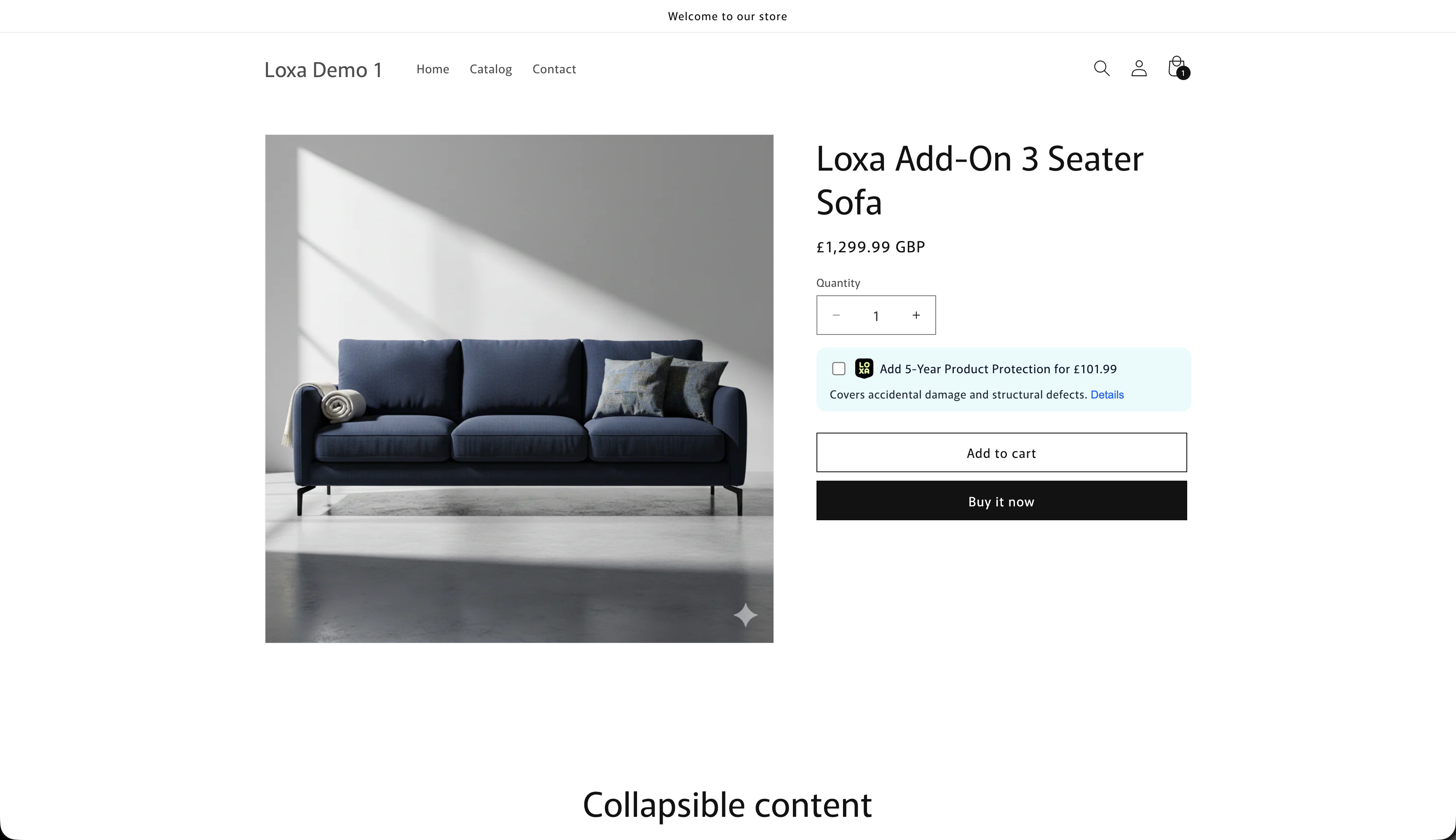
So... lets break this down. The only API endpoint that you need for the product page is /products/insurance-information. On page load perform an insurance-information call to retrieve the relevant insurance info for the product. Anything that changes configuration or price should trigger another call to get the relevant insurance information.
We use extensive caching on our side so response times should be very fast. However, if you would like better performance you can implement your own insurance information cache on product level. Any insurance information cached should be keyed to the SKU, Product Title, and Price to ensure any price changes or name changes to products trigger a new call to ensure the quote is correct. You should also make it easy to flush this cache when necessary
Is it insurable?
From the docs you'll see that this call returns some key values.
active: booleaninsurable: boolean
The first things to check are active and insurable. Both of these need to be true to proceed. If they are not both true, return and do not show the insurance offering. This initial check is extremely important for compliance reasons (you can read more about compliance here).
What to display
Both true? Great, the next thing to check is the integration_type. The integration type lets you know which insurances you should show and how you should show them. The example above is an Add On integration type. Let's have a look at the entire payload received for this product.
Top-level fields you'll use on the product page:
| Field | Example | Use |
|---|---|---|
insurable |
true |
Only show insurance if true |
active |
true |
Only show if both insurable and active are true |
integration_type |
"addon" |
Drives how you display options (addon / inclusive / hybrid_extension / hybrid_warranty) |
insurance_category |
"Furniture" |
Category label |
insurances |
array | List of options; use each item’s code when creating orders |
Each item in insurances[] includes code, name, pricing_type, insurance_price, insurance_term, default_selected, plus optional html_content and insurance_content for copy and sidebar/legal text.
Full example response (GET /products/insurance-information)
Expand to see a full example response including multiple options (add-on 5yr, add-on 3yr, inclusive 5yr) and html_content / insurance_content:
{
    "sku": "52587034706287",
    "product_price": 1299.99,
    "product_title": "Loxa Add-On 3 Seater Sofa",
    "insurable": true,
    "active": true,
    "integration_type": "addon",
    "insurance_category": "Furniture",
    "insurances": [
        {
            "code": "LDF5-20260119-23",
            "name": "Product Protection",
            "pricing_type": "addon",
            "inclusive_insurance": false,
            "insurance_price": 101.99,
            "insurance_term": "5",
            "min_insurable_price": 50.0,
            "default_selected": true,
            "html_content": "<div\n  id=\"loxa-shopify-offer\"\n  class=\"loxa-card loxa-add-on-badge\"\n  data-loxa-card-type=\"addon\"\n>\n  <div class=\"loxa-add-on-inner\">\n    <div class=\"loxa-add-on-main\">\n      <!-- Hidden real checkbox the JS listens to -->\n      <input\n        id=\"loxa-insurance-checkbox\"\n        type=\"checkbox\"\n        class=\"loxa-offer-checkbox\"\n        aria-hidden=\"true\"\n      />\n\n\n      <img\n        src=\"https://bolt-cover-assets.s3.eu-west-1.amazonaws.com/logo/LOXA_Stacked+Logo-Lime+on+Black.svg\"\n        alt=\"Loxa\"\n        class=\"loxa-add-on-logo\"\n      />\n\n      <span class=\"loxa-add-on-title\">\n        Add 5-Year Product Protection for £101.99\n      </span>\n    </div>\n\n    <p class=\"loxa-add-on-description\">\n      Covers accidental damage and structural defects.\n      <button class=\"loxa-learn-more-link loxa-details-link\" type=\"button\">\n        <span class=\"loxa-learn-more-link-text\">Details</span>\n      </button>\n    </p>\n  </div>\n</div>",
            "insurance_content": {
                "title": "Add {{term}}-Year Product Protection for £{{price}}",
                "learn_more": "Details",
                "description": "Covers accidental damage and structural defects.",
                "sidebar_content": {
                    "terms": {
                        "lines": [
                            "{tick}Covers accidental stains such as food, drink, ink, make up and more",
                            "{tick}Covers accidental damage such as rips, tears, scratches, burns and pet damage",
                            "{tick}If your claim is approved, our claims team arrange the right fix, which may be in-home repair or a replacement item",
                            "Does not cover wear and tear, misuse or issues already covered by your manufacturer warranty",
                            "For full details of what's covered and excluded, see the {%IPID%} and {%Policy Wording%}",
                            {
                                "links": {
                                    "IPID": "https://www.google.com",
                                    "Policy Wording": "https://www.google.com"
                                }
                            }
                        ],
                        "heading": "Details & Terms"
                    },
                    "header": "Add Protection, Enjoy Peace of Mind",
                    "subheading": "Add Product Protection from Loxa for extra peace of mind, helping protect your furniture from everyday accidents and unexpected faults.",
                    "legal_disclaimer": "This insurance is only available to residents of the UK. Loxa is an insurance intermediary authorised and regulated by the Financial Conduct Authority (FCA no. 1018666). Your cover is underwritten by Helvetia Global Solutions Ltd (FCA no. 454140)."
                }
            },
            "is_base_insurance_product": false,
            "extension": false,
            "base_insurance_product_code": null
        },
        {
            "code": "LDF3-20260119-24",
            "name": "Product Protection",
            "pricing_type": "addon",
            "inclusive_insurance": false,
            "insurance_price": 64.99,
            "insurance_term": "3",
            "min_insurable_price": 50.0,
            "default_selected": false,
            "html_content": "<div\n  id=\"loxa-shopify-offer\"\n  class=\"loxa-card loxa-add-on-badge\"\n  data-loxa-card-type=\"addon\"\n>\n  <div class=\"loxa-add-on-inner\">\n    <div class=\"loxa-add-on-main\">\n      <!-- Hidden real checkbox the JS listens to -->\n      <input\n        id=\"loxa-insurance-checkbox\"\n        type=\"checkbox\"\n        class=\"loxa-offer-checkbox\"\n        aria-hidden=\"true\"\n      />\n\n\n      <img\n        src=\"https://bolt-cover-assets.s3.eu-west-1.amazonaws.com/logo/LOXA_Stacked+Logo-Lime+on+Black.svg\"\n        alt=\"Loxa\"\n        class=\"loxa-add-on-logo\"\n      />\n\n      <span class=\"loxa-add-on-title\">\n        Add 3-Year Product Protection for £64.99\n      </span>\n    </div>\n\n    <p class=\"loxa-add-on-description\">\n      Covers accidental damage and structural defects.\n      <button class=\"loxa-learn-more-link loxa-details-link\" type=\"button\">\n        <span class=\"loxa-learn-more-link-text\">Details</span>\n      </button>\n    </p>\n  </div>\n</div>",
            "insurance_content": {
                "title": "Add {{term}}-Year Product Protection for £{{price}}",
                "learn_more": "Details",
                "description": "Covers accidental damage and structural defects.",
                "sidebar_content": {
                    "terms": {
                        "lines": [
                            "{tick}Covers accidental stains such as food, drink, ink, make up and more",
                            "{tick}Covers accidental damage such as rips, tears, scratches, burns and pet damage",
                            "{tick}If your claim is approved, our claims team arrange the right fix, which may be in-home repair or a replacement item",
                            "Does not cover wear and tear, misuse or issues already covered by your manufacturer warranty",
                            "For full details of what's covered and excluded, see the {%IPID%} and {%Policy Wording%}",
                            {
                                "links": {
                                    "IPID": "https://www.google.com",
                                    "Policy Wording": "https://www.google.com"
                                }
                            }
                        ],
                        "heading": "Details & Terms"
                    },
                    "header": "Add Protection, Enjoy Peace of Mind",
                    "subheading": "Add Product Protection from Loxa for extra peace of mind, helping protect your furniture from everyday accidents and unexpected faults.",
                    "legal_disclaimer": "This insurance is only available to residents of the UK. Loxa is an insurance intermediary authorised and regulated by the Financial Conduct Authority (FCA no. 1018666). Your cover is underwritten by Helvetia Global Solutions Ltd (FCA no. 454140)."
                }
            },
            "is_base_insurance_product": false,
            "extension": false,
            "base_insurance_product_code": null
        },
        {
            "code": "LDF5-20260120-30",
            "name": "Product Protection",
            "pricing_type": "inclusive",
            "inclusive_insurance": true,
            "insurance_price": 0.0,
            "insurance_term": "5",
            "min_insurable_price": 50.0,
            "default_selected": false,
            "html_content": "<div\n  id=\"loxa-shopify-offer\"\n  class=\"loxa-card loxa-add-on-badge\"\n  data-loxa-card-type=\"addon\"\n>\n  <div class=\"loxa-add-on-inner\">\n    <div class=\"loxa-add-on-main\">\n      <!-- Hidden real checkbox the JS listens to -->\n      <input\n        id=\"loxa-insurance-checkbox\"\n        type=\"checkbox\"\n        class=\"loxa-offer-checkbox\"\n        aria-hidden=\"true\"\n      />\n\n\n      <img\n        src=\"https://bolt-cover-assets.s3.eu-west-1.amazonaws.com/logo/LOXA_Stacked+Logo-Lime+on+Black.svg\"\n        alt=\"Loxa\"\n        class=\"loxa-add-on-logo\"\n      />\n\n      <span class=\"loxa-add-on-title\">\n        Free 5-Year Protection Included\n      </span>\n    </div>\n\n    <p class=\"loxa-add-on-description\">\n      Protects you against accidental stains, accidental damage and structural defects.\n      <button class=\"loxa-learn-more-link loxa-details-link\" type=\"button\">\n        <span class=\"loxa-learn-more-link-text\">What's included?</span>\n      </button>\n    </p>\n  </div>\n</div>",
            "insurance_content": {
                "title": "Free {{term}}-Year Protection Included",
                "learn_more": "What's included?",
                "description": "Protects you against accidental stains, accidental damage and structural defects.",
                "sidebar_content": {
                    "terms": {
                        "lines": [
                            "Covers accidental stains such as food, drink, ink, make up and more",
                            "Covers accidental damage such as rips, tears, scratches, burns and pet damage",
                            "If your claim is approved, our claims team arrange the right fix, which may be in-home repair or a replacement item",
                            "Does not cover wear and tear, misuse or issues already covered by your manufacturer warranty",
                            "For full details of what's covered and excluded, see the {%IPID%} and {%Policy Wording%}",
                            {
                                "links": {
                                    "IPID": "https://www.google.com",
                                    "Policy Wording": "https://www.google.com"
                                }
                            }
                        ],
                        "heading": "What's Covered"
                    },
                    "header": "5-Year Protection Included",
                    "subheading": "This product already includes 5-Year Extended Warranty & Accidental Damage protection at no cost to you."
                }
            },
            "is_base_insurance_product": false,
            "extension": false,
            "base_insurance_product_code": null
        }
    ]
}
A lot of information right? And why is there an insurance with pricing_type inclusive for an addon integration_type? Well some of our Point Of Sale solutions allow retail workers to offer the inclusive option as an upsell, for a product display page integration you can ignore the inclusive insurance when integration_type is addon.
So for this example there are two relevant insurances with pricing_type: addon, a 3 year and a 5 year insurance product. We can look for the default_selected flag to check which one should be the main offering.
if no insurance has default_selected: true we recommend having a fallback rule to either show the most expensive option or the least expensive option depending on your preference
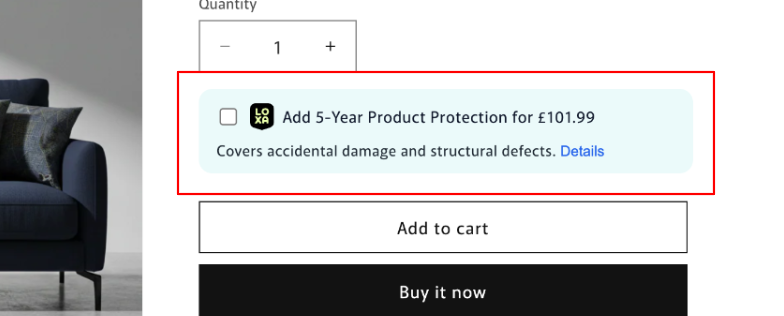
For this product the default selected is the 5 year insurance product. We can grab the html directly from this insurance from response["insurances"]["*default_selected insurance index*"]["html_content]. The stylesheet for this can be found at https://d1z4id7lgyqeko.cloudfront.net/base.css, you can import this stylesheet directly into your html or you can use it as inspiration and add the relevant styles where you usually keep them. You can also construct this badge yourself using the insurance_content that each insurance has.
The Sidebar
When a user clicks on the details on the badge, a button that has the helpful class loxa-learn-more-link, we should trigger the sidebar to open. This sidebar is constructed using the information insurance_content. Let's have a look at the insurance content for the 5 year insurance in this example:
{
  "insurance_content": {
    "title": "Add {{term}}-Year Product Protection for £{{price}}",
    "learn_more": "Details",
    "description": "Covers accidental damage and structural defects.",
    "sidebar_content": {
      "terms": {
        "lines": [
          "{tick}Covers accidental stains such as food, drink, ink, make up and more",
          "{tick}Covers accidental damage such as rips, tears, scratches, burns and pet damage",
          "{tick}If your claim is approved, our claims team arrange the right fix, which may be in-home repair or a replacement item",
          "Does not cover wear and tear, misuse or issues already covered by your manufacturer warranty",
          "For full details of what's covered and excluded, see the {%IPID%} and {%Policy Wording%}",
          {
            "links": {
              "IPID": "https://www.google.com",
              "Policy Wording": "https://www.google.com"
            }
          }
        ],
        "heading": "Details & Terms"
      },
      "header": "Add Protection, Enjoy Peace of Mind",
      "subheading": "Add Product Protection from Loxa for extra peace of mind, helping protect your furniture from everyday accidents and unexpected faults.",
      "legal_disclaimer": "This insurance is only available to residents of the UK. Loxa is an insurance intermediary authorised and regulated by the Financial Conduct Authority (FCA no. 1018666). Your cover is underwritten by Helvetia Global Solutions Ltd (FCA no. 454140)."
    }
  }
}
We use this to construct the sidebar:
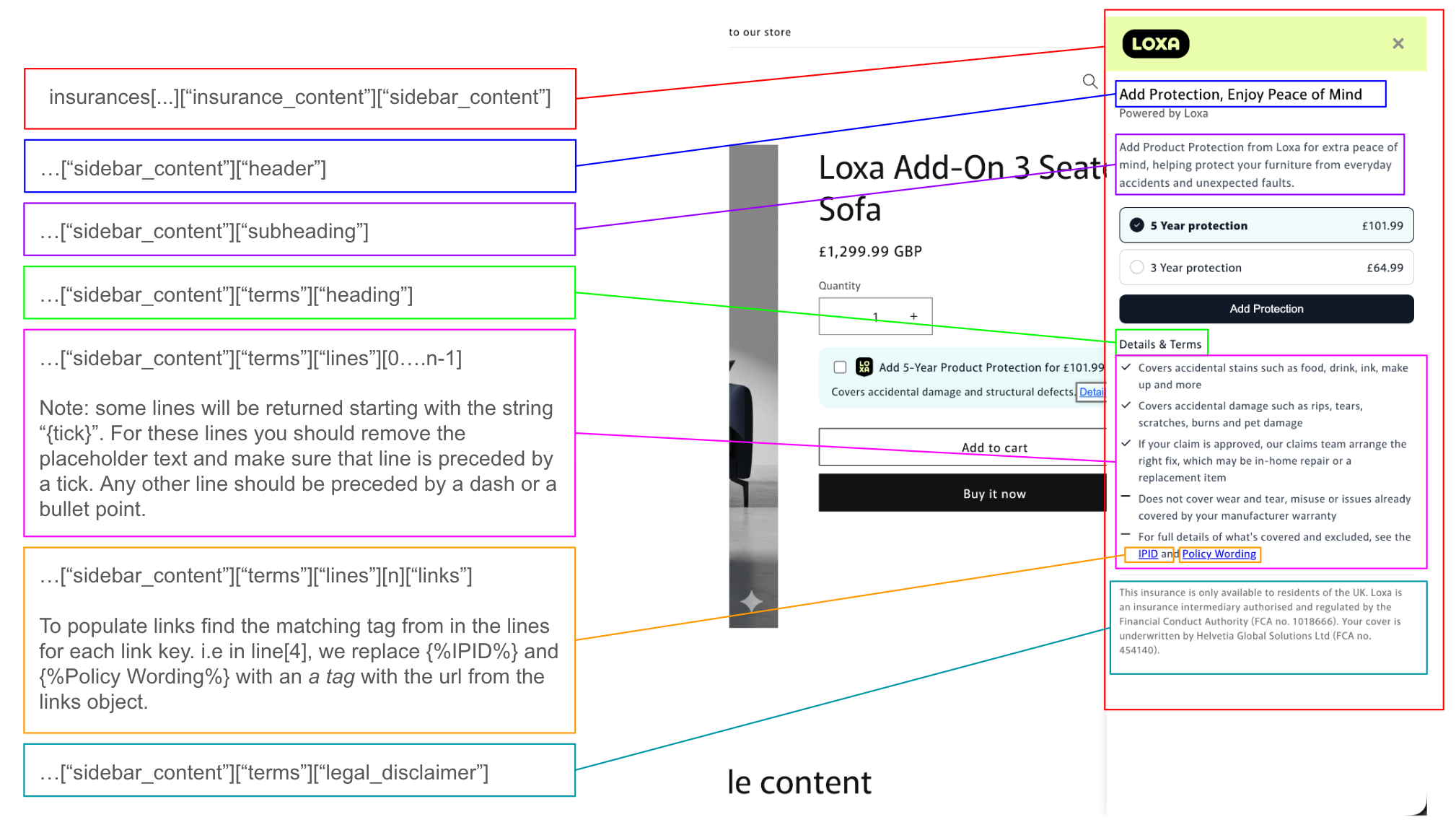
In the sidebar we display the insurance_content for the selected insurance as well as each other insurance option with the matching pricing_types. For example, here we show the 3 year option with the price displayed. The default option should be preselected or if they had already checked the insurance badge's checkbox on the PDP the option selected should be shown along with the sidebar content.
When an insurance is selected and the "Add Protection" button is clicked it should update the checkbox to show as ticked. Another nice to have at this point is to update price, by showing something like: "Product + Protection: £1401.98".
If add to cart is selected with an insurance option selected, you need to keep track of the insurance_code of the selected insurance as well as the insurance_price for that insurance. The actual add to cart functionality will vary from platform to platform, for example our shopify app uses cart transforms, our magento app uses extension attributes on the line item. Whatever method you choose, you need to make sure that it is clear to your customer that they have added the product with insurance and display the price correctly for both the product and the insurance.
Checkout
When someone checks out with one or many insured products you can use the /orders endpoint to post the order to us using the selected insurance code and insurance price. When orders are cancelled use the Cancellation Endpoints to notify us.
Inclusive
We'll see with an inclusive integration that much of the display and process is the same as an addon integration.
Below is an example of an inclusive integration from our demo site:
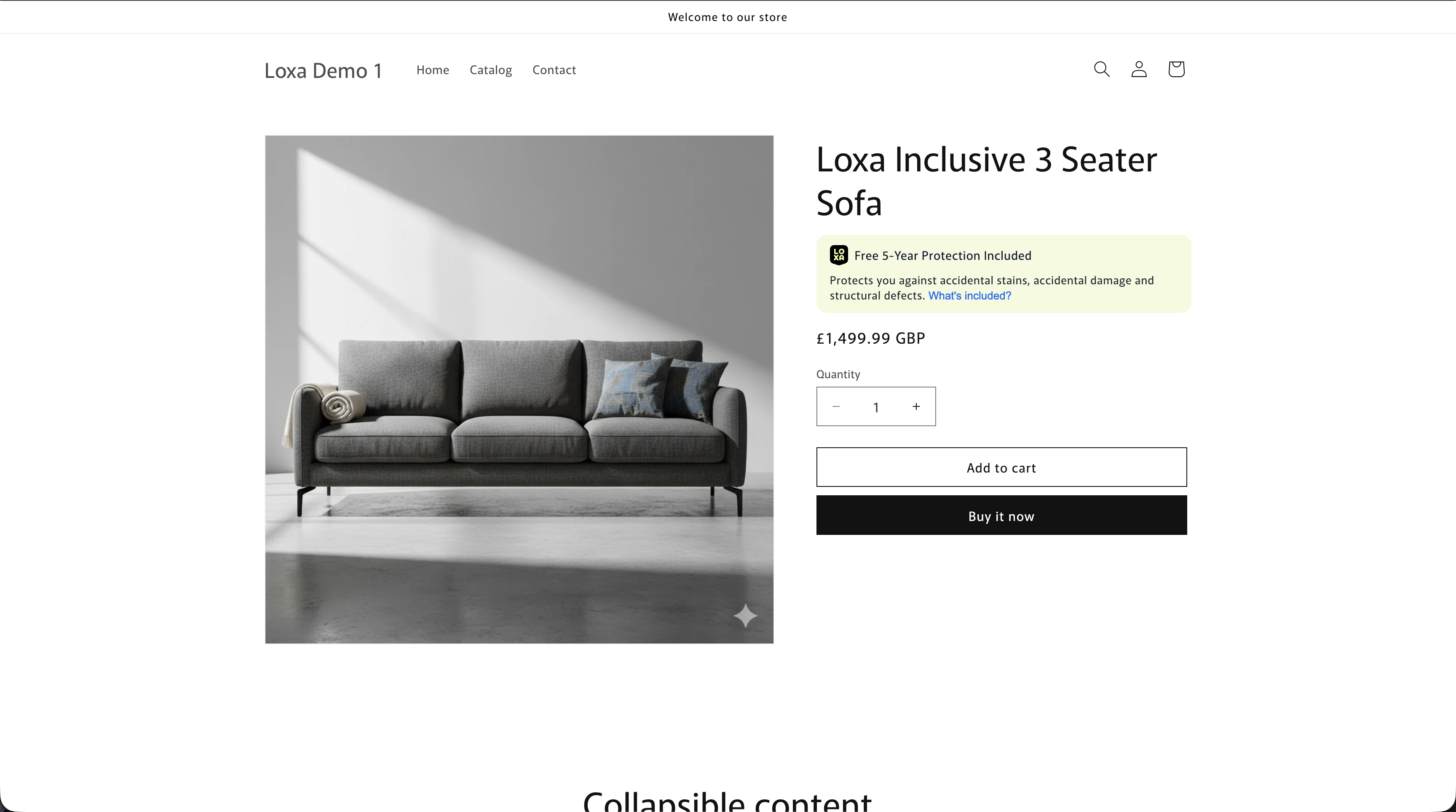
We follow the same steps as above, calling /products/insurance-information.
Again we want to check active and insurable first to see if we should continue. And then for this example the integration_type is inclusive.
Expand to see a full example response (GET /products/insurance-information) for a product with integration_type: inclusive
Full example response for an inclusive integration_type:
{
    "sku": "52595576045935",
    "product_price": 1499.99,
    "product_title": "Loxa Inclusive 3 Seater Sofa",
    "insurable": true,
    "active": true,
    "integration_type": "inclusive",
    "insurance_category": "Furniture",
    "insurances": [
        {
            "code": "LDF5-20260120-30",
            "name": "Product Protection",
            "pricing_type": "inclusive",
            "inclusive_insurance": true,
            "insurance_price": 0.0,
            "insurance_term": "5",
            "min_insurable_price": 50.0,
            "default_selected": false,
            "html_content": "<div\n  id=\"loxa-shopify-offer\"\n  class=\"loxa-card loxa-inclusive-badge\"\n  data-loxa-card-type=\"addon\"\n>\n  <div class=\"loxa-add-on-inner\">\n    <div class=\"loxa-add-on-main\">\n      <input\n        id=\"loxa-insurance-checkbox\"\n        type=\"checkbox\"\n        class=\"loxa-offer-checkbox\"\n        style=\"position:absolute;opacity:0;width:1px;height:1px;pointer-events:none;display:none;\"\n        aria-hidden=\"true\"\n        checked\n      />\n\n      <img\n        src=\"https://bolt-cover-assets.s3.eu-west-1.amazonaws.com/logo/LOXA_Stacked+Logo-Lime+on+Black.svg\"\n        alt=\"Loxa\"\n        class=\"loxa-add-on-logo\"\n      />\n\n      <span class=\"loxa-inclusive-title\">\n        Free 5-Year Protection Included\n      </span>\n    </div>\n\n    <p class=\"loxa-inclusive-description\">\n      Protects you against accidental stains, accidental damage and structural defects.\n      <button class=\"loxa-learn-more-link loxa-inclusive-details-link\" type=\"button\">\n        <span class=\"loxa-learn-more-link-text\">What's included?</span>\n      </button>\n    </p>\n  </div>\n</div>",
            "insurance_content": {
                "title": "Free {{term}}-Year Protection Included",
                "learn_more": "What's included?",
                "description": "Protects you against accidental stains, accidental damage and structural defects.",
                "opt_in_link": "Add free protection",
                "opt_out_title": "Free 5 Year Protection Removed",
                "sidebar_content": {
                    "terms": {
                        "lines": [
                            "{tick}Covers accidental stains such as food, drink, ink, make up and more",
                            "{tick}Covers accidental damage such as rips, tears, scratches, burns and pet damage",
                            "{tick}For approved claims, our team will arrange the right fix, which may be at-home repair or a replacement item",
                            "Does not cover wear and tear, misuse or issues already covered by your manufacturer warranty",
                            "For full details of what's covered and excluded, see the {%IPID%} and {%Policy Wording%}",
                            {
                                "links": {
                                    "IPID": "https://www.google.com",
                                    "Policy Wording": "https://www.google.com"
                                }
                            }
                        ],
                        "heading": "What to expect"
                    },
                    "header": "5-Year Protection Included",
                    "subheading": "This product includes 5 Year Extended Warranty & Accidental Damage protection at no cost to you.",
                    "footer_pill": "This protection is paid for by the retailer at no cost to you."
                },
                "opt_out_description": "You've chosen not to include free protection with your order."
            },
            "is_base_insurance_product": false,
            "extension": false,
            "base_insurance_product_code": null
        }
    ]
}
What to display
For a product with integration_type: inclusive we can see that we only get one insurance back from the insurance-information call. This is because when the the product has included insurance there will only ever be one insurance which is agreed upon by Loxa and the Retailer.
Once again you can use the html_content returned for the badge along with our css from https://d1z4id7lgyqeko.cloudfront.net/base.css or construct it yourself from the insurance_content. We have a few extra fields here compared to the insurances with pricing_type: addon to deal with how the user opts out of the complimentary insurance. Even though the insurance is free to the end customer, due to regulation they must have an option to opt out (see Compliance for more info). So we have these extra field in the insurance_content:
| Field | Use |
|---|---|
opt_out_title |
Replaces title text on the badge |
opt_out_description |
Replaces description text on the badge |
opt_in_link. |
Buttton text to opt back into free cover. Placed at the end of the opt_out_description |
sidebar_content["footer_pill"] |
Text for below term lines inside the sidebar |
So the sidebar ends up looking like this:
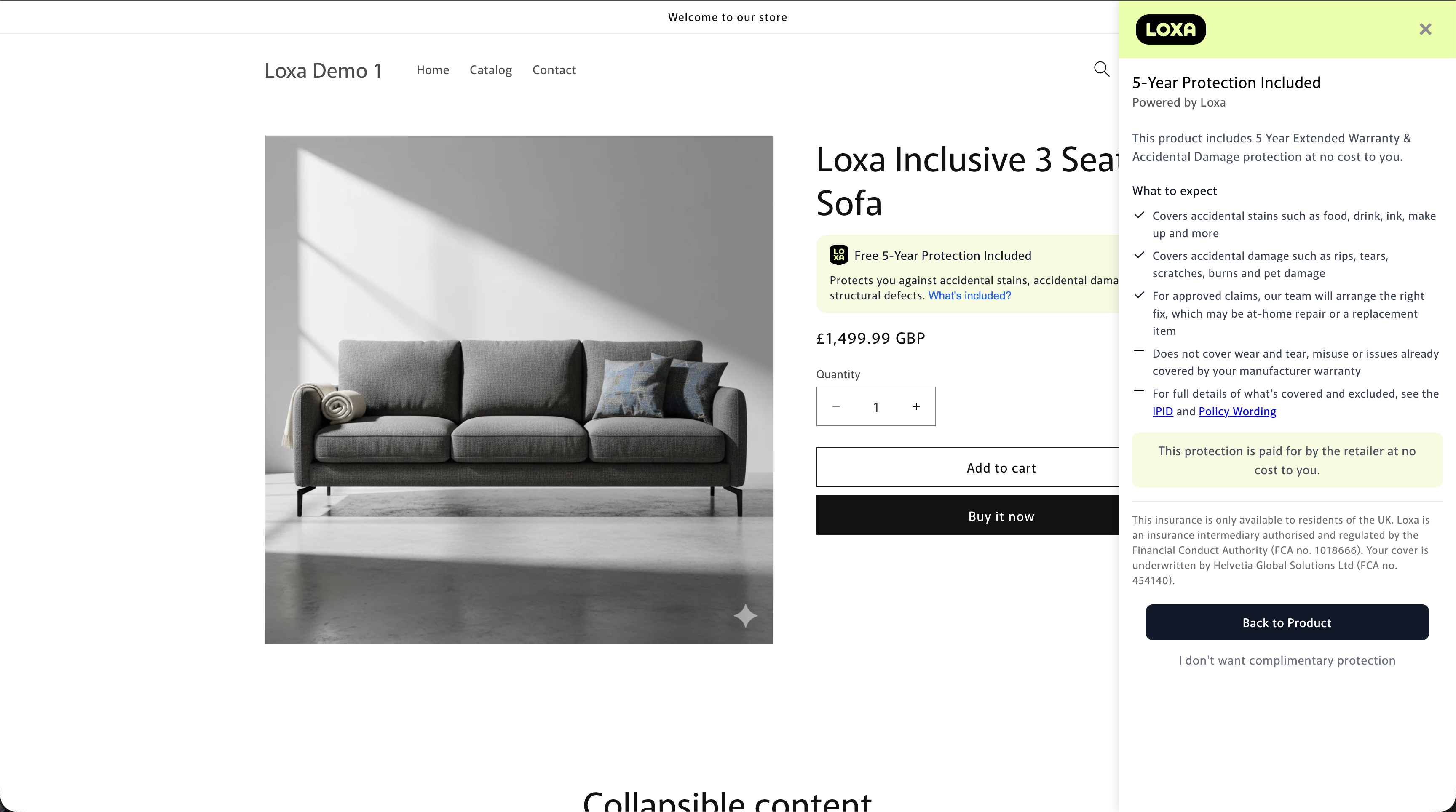
We use the same layout and structure as an addon integration_type, filling out the header, subheading, terms etc. However we also have the footer_pill which is displayed below the terms. In this case it's making clear to the customer that the insurance is complimentary and paid for by the retailer.
Opting out
When the user clicks on "I don't want complimentary insurance" underneath the "Back to Product" button we update the pdp page to look like this, using the opt_out title and description and the opt_in_link:
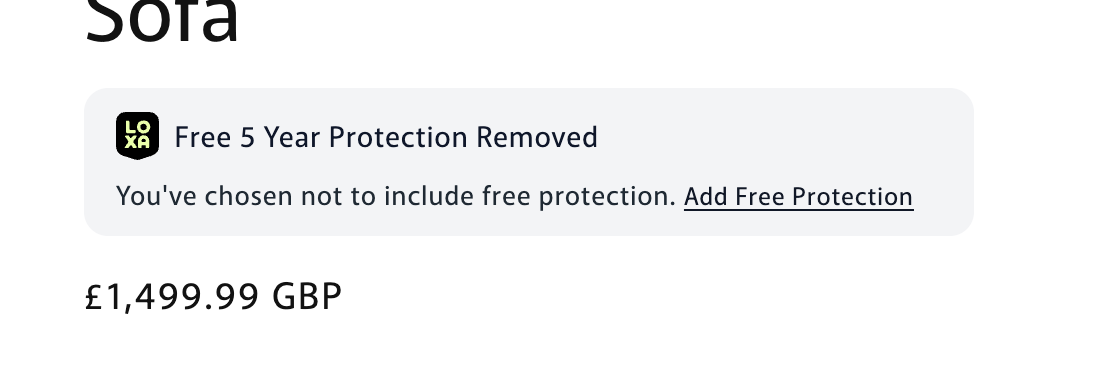
If the user then clicks the "Add Free Protection" we keep track of the users decision and return the badge to it's original state.
Basket and Checkout
Just as before with addon we now need to keep track of the returned inclusive insurance products code, in our example it was LDF5-20260120-30, and the insurance price 0.0 (for inclusive integration types the insurance price always 0.0). These values can then be used to POST the order to us using the /orders endpoints. We again want to make it clear to the customer in the cart that the product comes with Loxa Product Protection.
Cancellations can then be triggered in a way that works best with your system using the relevant endpoints.
Hybrid Extension
The next integration_type is hybrid_extension
What to display
This is effectively both of the above integrations types shown together on the product page. Like below:
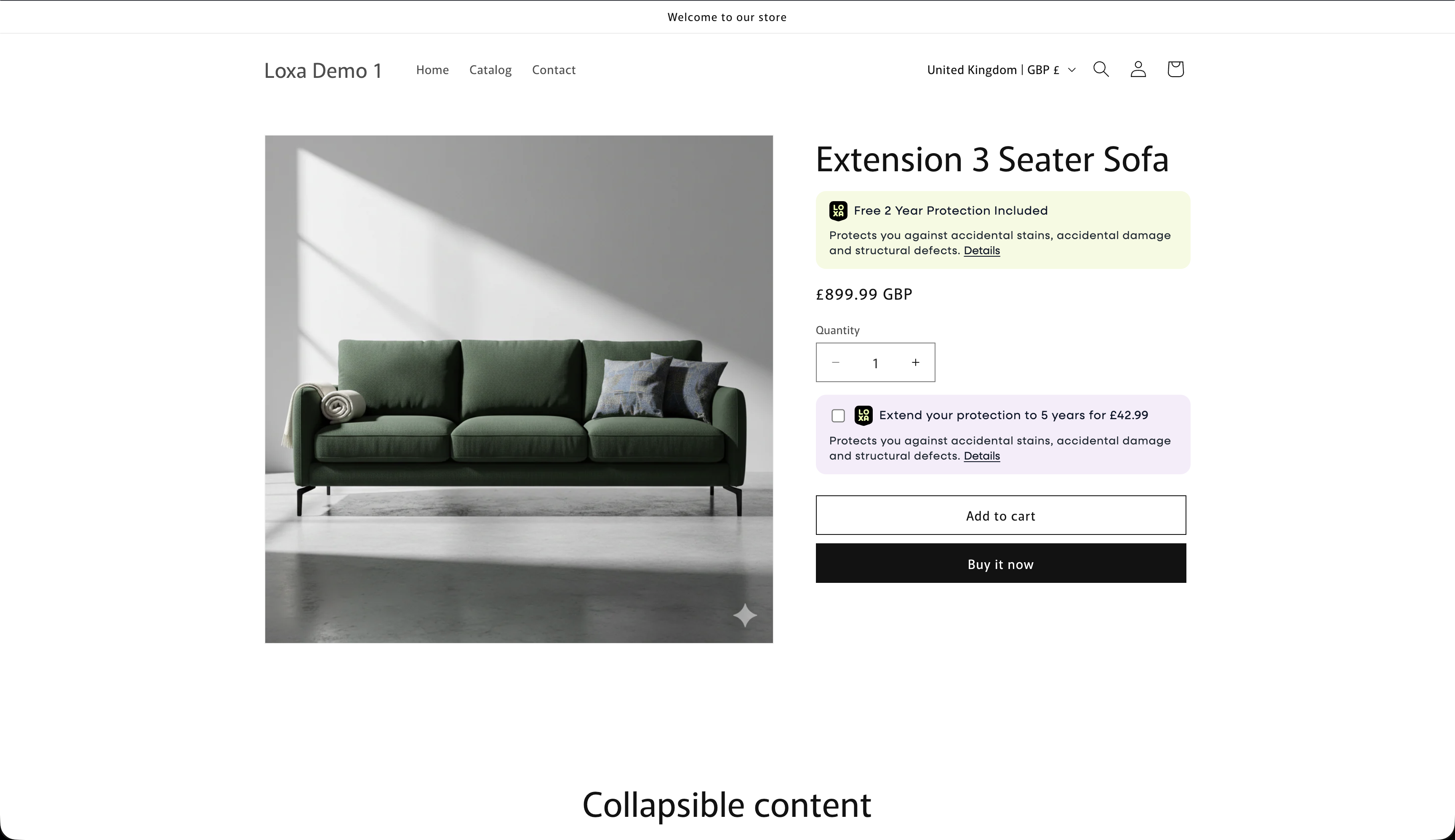
The same call to /products/insurance-information is made and in this case we are returned both the inlcusive insurance product as well as the associated extension(s).
Again we want to check active and insurable first to see if we should continue. And then for this example the integration_type is hybrid_extension.
Expand to see a full example response (GET /products/insurance-information) for a product with integration_type: hybrid_extension
Full example response for an inclusive integration_type:
{
"sku": "52595580436847",
"product_price": 1499.99,
"product_title": "Extension 3 Seater Sofa",
"insurable": true,
"active": true,
"integration_type": "hybrid_extension",
"insurance_category": "Furniture",
"insurances": [
    {
        "code": "LDF2-20260120-29",
        "name": "Product Protection",
        "pricing_type": "inclusive",
        "inclusive_insurance": true,
        "insurance_price": 0,
        "insurance_term": "2",
        "min_insurable_price": 50.0,
        "default_selected": false,
        "html_content": "<div\n  id=\"loxa-shopify-offer\"\n  class=\"loxa-card loxa-inclusive-badge\"\n  data-loxa-card-type=\"addon\"\n>\n  <div class=\"loxa-add-on-inner\">\n    <div class=\"loxa-add-on-main\">\n      <input\n        id=\"loxa-insurance-checkbox\"\n        type=\"checkbox\"\n        class=\"loxa-offer-checkbox\"\n        style=\"position:absolute;opacity:0;width:1px;height:1px;pointer-events:none;display:none;\"\n        aria-hidden=\"true\"\n        checked\n      />\n\n      <img\n        src=\"https://bolt-cover-assets.s3.eu-west-1.amazonaws.com/logo/LOXA_Stacked+Logo-Lime+on+Black.svg\"\n        alt=\"Loxa\"\n        class=\"loxa-add-on-logo\"\n      />\n\n      <span class=\"loxa-inclusive-title\">\n        Free 2 Year Protection Included\n      </span>\n    </div>\n\n    <p class=\"loxa-inclusive-description\">\n      Protects you against accidental stains, accidental damage and structural defects.\n      <button class=\"loxa-learn-more-link loxa-inclusive-details-link\" type=\"button\">\n        <span class=\"loxa-learn-more-link-text\">Details</span>\n      </button>\n    </p>\n  </div>\n</div>",
        "insurance_content": {
            "title": "Free {{term}} Year Protection Included",
            "learn_more": "Details",
            "description": "Protects you against accidental stains, accidental damage and structural defects.",
            "sidebar_content": {
                "terms": {
                    "lines": [
                        "{tick}Covers accidental stains such as food, drink, ink, make up and more",
                        "{tick}Covers accidental damage such as rips, tears, scratches, burns and pet damage",
                        "{tick}If your claim is approved, our claims team arrange the right fix, which may be in-home repair or a replacement item",
                        "Does not cover wear and tear, misuse or issues already covered by your manufacturer warranty",
                        "For full details of what's covered and excluded, see the {%IPID%} and {%Policy Wording%}",
                        {
                            "links": {
                                "IPID": "https://www.google.com",
                                "Policy Wording": "https://www.google.com"
                            }
                        }
                    ],
                    "heading": "What to expect"
                },
                "header": "2 Years of Protection Included",
                "subheading": "This product includes 2 Year Extended Warranty & Accidental Damage protection at no cost to you.",
                "footer_pill": "This protection is paid for by the retailer at no cost to you."
            }
        },
        "is_base_insurance_product": true,
        "extension": false,
        "base_insurance_product_code": null
    },
    {
        "code": "LDF3-20260120-31",
        "name": "Product Protection",
        "pricing_type": "extension",
        "inclusive_insurance": false,
        "insurance_price": 26.99,
        "insurance_term": "3",
        "min_insurable_price": 50.0,
        "default_selected": false,
        "html_content": "<div\n  id=\"loxa-shopify-offer\"\n  class=\"loxa-card loxa-extended-badge\"\n  data-loxa-card-type=\"addon\"\n>\n  <div class=\"loxa-add-on-inner\">\n    <div class=\"loxa-add-on-main\">\n      <!-- Hidden real checkbox the JS listens to -->\n      <input\n        id=\"loxa-insurance-checkbox\"\n        type=\"checkbox\"\n        class=\"loxa-offer-checkbox\"\n        aria-hidden=\"true\"\n      />\n\n      <img\n        src=\"https://bolt-cover-assets.s3.eu-west-1.amazonaws.com/logo/LOXA_Stacked+Logo-Lime+on+Black.svg\"\n        alt=\"Loxa\"\n        class=\"loxa-add-on-logo\"\n      />\n\n      <span class=\"loxa-add-on-title\">\n        Extend your protection to 3 years for £26.99\n      </span>\n    </div>\n\n    <p class=\"loxa-add-on-description\">\n      Protects you against accidental stains, accidental damage and structural defects.\n      <button class=\"loxa-learn-more-link loxa-details-link\" type=\"button\">\n        <span class=\"loxa-learn-more-link-text\">Details</span>\n      </button>\n    </p>\n  </div>\n</div>",
        "insurance_content": {
            "title": "Extend your protection to {{term}} years for £{{price}}",
            "learn_more": "Details",
            "description": "Protects you against accidental stains, accidental damage and structural defects.",
            "sidebar_content": {
                "terms": {
                    "lines": [
                        "{tick}Covers accidental stains such as food, drink, ink, make up and more",
                        "{tick}Covers accidental damage such as rips, tears, scratches, burns and damage caused by pets",
                        "{tick}For approved claims, our team will arrange the right fix, which may be at-home repair or a replacement item",
                        "Does not cover wear and tear, misuse or issues already covered by your manufacturer warranty",
                        "For full details of what's covered and excluded, see the {%IPID%} and {%Policy Wording%}",
                        {
                            "links": {
                                "IPID": "https://www.google.com",
                                "Policy Wording": "https://www.google.com"
                            }
                        }
                    ],
                    "heading": "What to expect"
                },
                "header": "Add Protection, Enjoy Peace of Mind",
                "subheading": "You already have 2 Year protection included. You can extend your cover for extra peace of mind, helping protect your furniture from everyday accidents and unexpected faults."
            }
        },
        "is_base_insurance_product": false,
        "extension": true,
        "base_insurance_product_code": "LDF2-20260120-29"
    },
    {
        "code": "LDF5-20260120-32",
        "name": "Product Protection",
        "pricing_type": "extension",
        "inclusive_insurance": false,
        "insurance_price": 70.99,
        "insurance_term": "5",
        "min_insurable_price": 50.0,
        "default_selected": true,
        "html_content": "<div\n  id=\"loxa-shopify-offer\"\n  class=\"loxa-card loxa-extended-badge\"\n  data-loxa-card-type=\"addon\"\n>\n  <div class=\"loxa-add-on-inner\">\n    <div class=\"loxa-add-on-main\">\n      <!-- Hidden real checkbox the JS listens to -->\n      <input\n        id=\"loxa-insurance-checkbox\"\n        type=\"checkbox\"\n        class=\"loxa-offer-checkbox\"\n        aria-hidden=\"true\"\n      />\n\n      <img\n        src=\"https://bolt-cover-assets.s3.eu-west-1.amazonaws.com/logo/LOXA_Stacked+Logo-Lime+on+Black.svg\"\n        alt=\"Loxa\"\n        class=\"loxa-add-on-logo\"\n      />\n\n      <span class=\"loxa-add-on-title\">\n        Extend your protection to 5 years for £70.99\n      </span>\n    </div>\n\n    <p class=\"loxa-add-on-description\">\n      Protects you against accidental stains, accidental damage and structural defects.\n      <button class=\"loxa-learn-more-link loxa-details-link\" type=\"button\">\n        <span class=\"loxa-learn-more-link-text\">Details</span>\n      </button>\n    </p>\n  </div>\n</div>",
        "insurance_content": {
            "title": "Extend your protection to {{term}} years for £{{price}}",
            "learn_more": "Details",
            "description": "Protects you against accidental stains, accidental damage and structural defects.",
            "sidebar_content": {
                "terms": {
                    "lines": [
                        "{tick}Covers accidental stains such as food, drink, ink, make up and more",
                        "{tick}Covers accidental damage such as rips, tears, scratches, burns and damage caused by pets",
                        "{tick}For approved claims, our team will arrange the right fix, which may be at-home repair or a replacement item",
                        "Does not cover wear and tear, misuse or issues already covered by your manufacturer warranty",
                        "For full details of what's covered and excluded, see the {%IPID%} and {%Policy Wording%}",
                        {
                            "links": {
                                "IPID": "https://www.google.com",
                                "Policy Wording": "https://www.google.com"
                            }
                        }
                    ],
                    "heading": "What to expect"
                },
                "header": "Add Protection, Enjoy Peace of Mind",
                "subheading": "You already have 2 Year protection included. You can extend your cover for extra peace of mind, helping protect your furniture from everyday accidents and unexpected faults."
            }
        },
        "is_base_insurance_product": false,
        "extension": true,
        "base_insurance_product_code": "LDF2-20260120-29"
    }
]
}
You'll notice that the inclusive product has the attribute is_base_insurance_product as true and that the extensions have the extension attribute as true and base_insurance_product_code as LDF2-20260120-29. This is the code of the inclusive insurance product that these extensions are for.
Note
You should only ever receive the inclusive insurance product and its associated extensions but using the attributes mentioned above is good practise to make sure you are displaying the correct hybrid_extension insurance products for the PDP page product. If these codes do not line up DO NOT display the Loxa integration on the product page and contact Loxa.
Sidebars
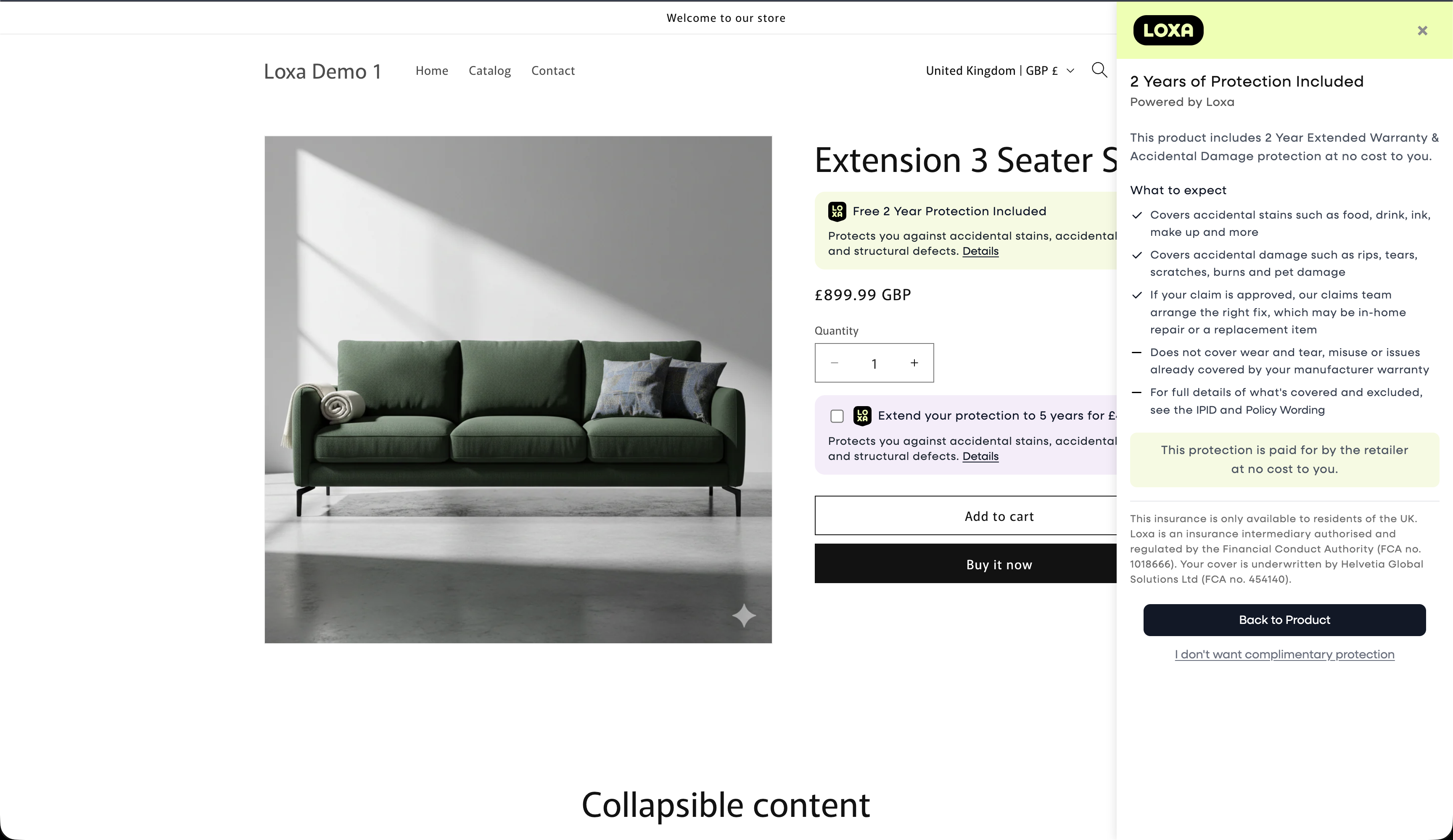
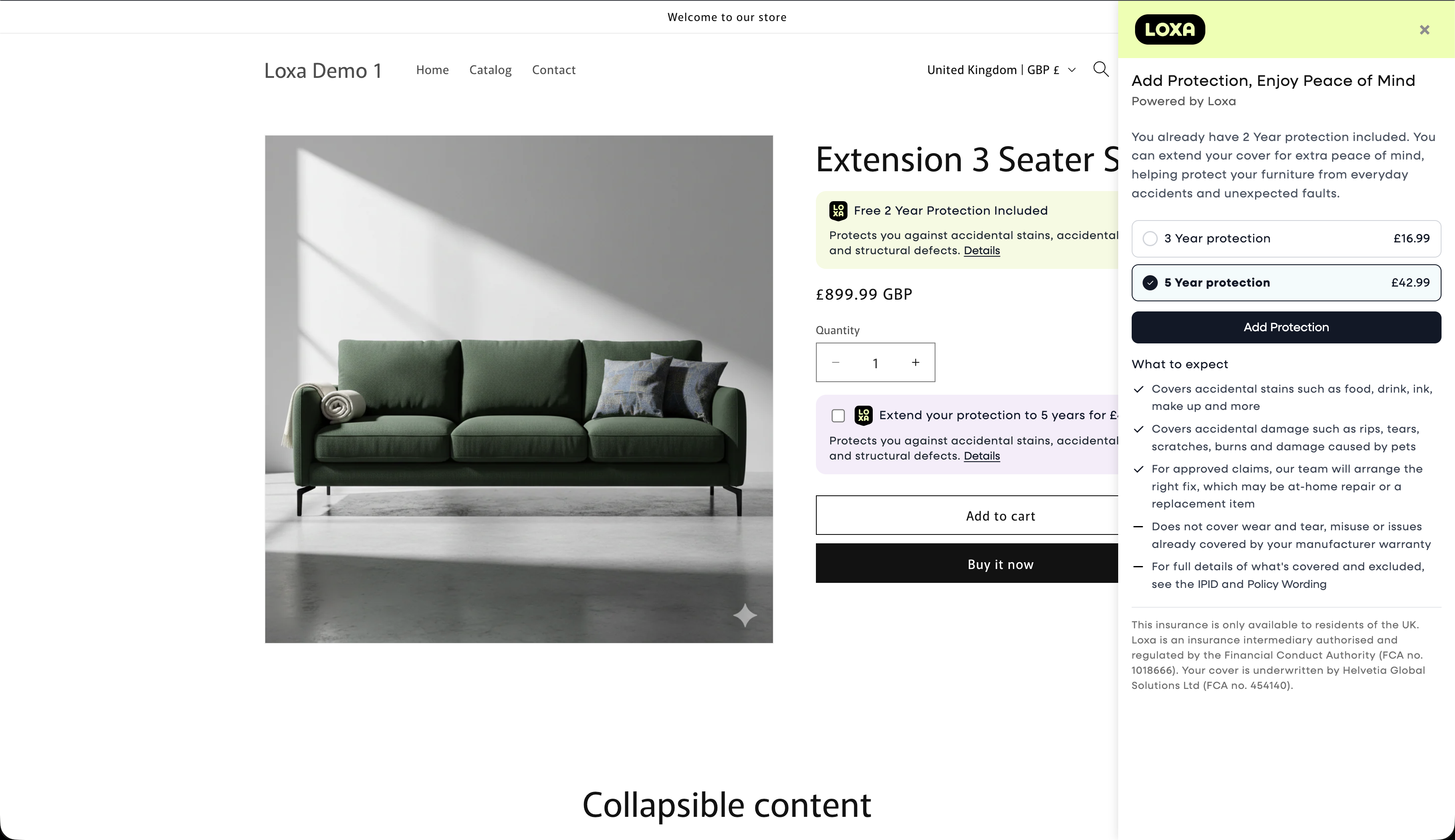
In the hybrid_extension scenario we need to display both the sidebar for the inclusive insurance and the extension.
These sidebars are built in the same way as before and should be triggered by the learn_more link on the insurance badge.
Inclusive sidebar:
Extension sidebar:
Hybrid Extension Scenarios
The main difference here is how we track the insurance added through the cart and checkout flow. As the extension insurance product is dependent on the inclusive product the user should not be allowed to proceed with the extension selected having opted out of the inclusive insurance. When the extension is selected the opt out button inside the inclusive sidebar should not be shown. If the user has already opted out of the inclusive product and then opts in to the extension, the inclusive option should also be reenabled.
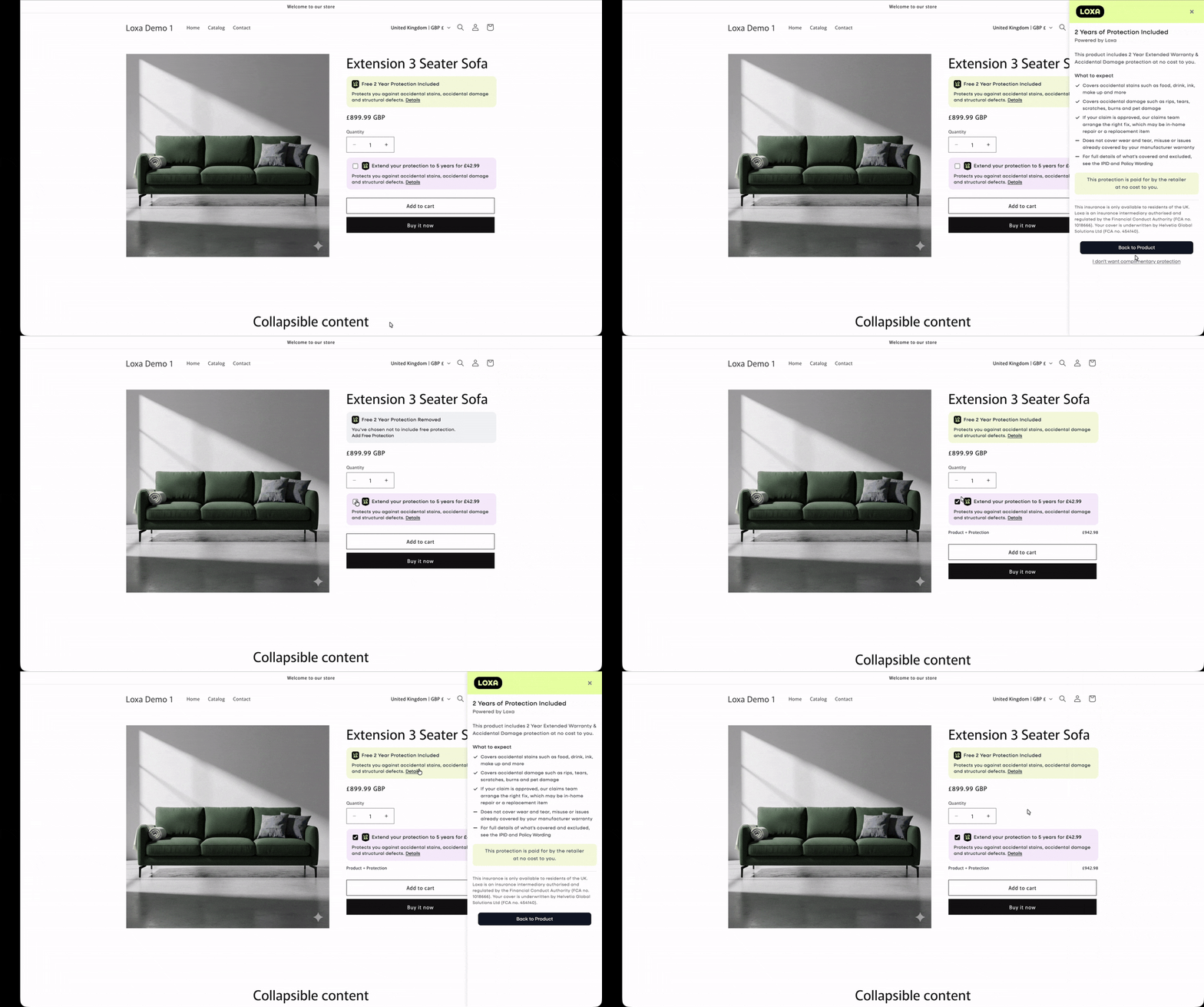
So there's three outcomes from here:
- The user has opted out of the inclusive insurance. In this case we track no insurance codes and add to cart and checkout continues as normal
- The user keeps the inclusive insurance but does not opt for an extension. In this case we keep track of the inclusive insurance code and pass it through the order flow to use in the Order Post as the
loxa-inclusive-code - The user opts in to an extension. In this case we track both the insurance code for the inclusive insurance product to use as the
loxa-inclusive-codeand the selected extension insurance product code to use as theloxa-insurance-codein the Order Post.
Warning
As mention above there should never be a scenario in which the extension is selected and the inclusive option is in a deselected state. For hybrid extension orders we need both the inclusive insurance code and the extension insurance code.
The rest is the same cart and checkout experience, ensuring the prices and insurance show in the cart for their selected option and the correct codes are used when you POST the order to us.
Second Chance Mechanism
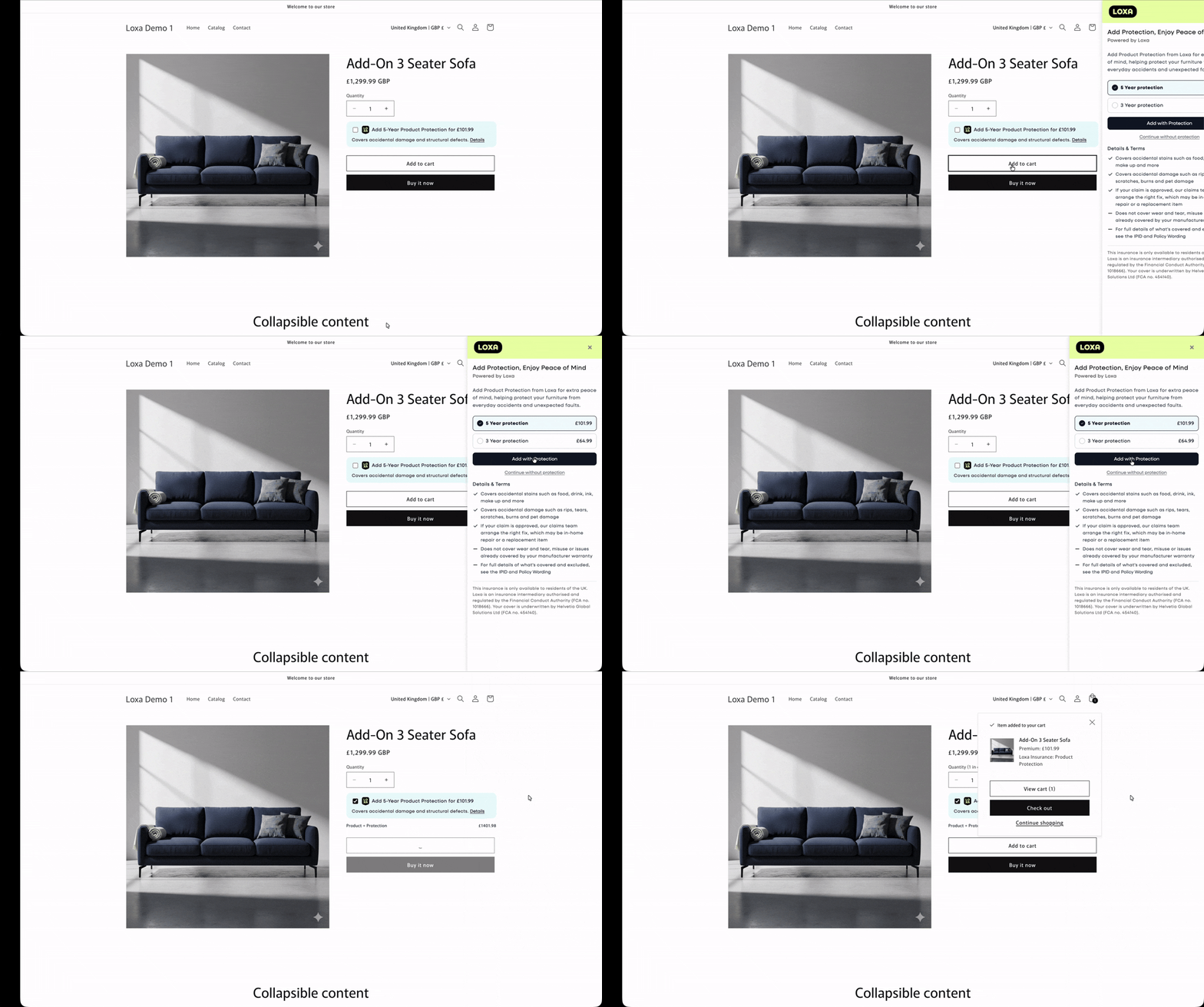
To drive a higher attachment rate we recommend using a second chance mechanism to make sure that the customer is aware that they could insure the product they are buying. The flow for this is fairly simple and reuses a lot of what has been discussed above:
If the user hasn't selected to include insurance and clicks the add to cart button, we intercept the add to cart event and display the sidebar with an option to add with insurance or continue without.
Post Checkout
Once the order is set to us using the Order endpoint, the Policy will be in our system. The customer will receive a welcome email from us with relevant policy documentation.
Cancellations
If an order is cancelled or returned and the insurance is refunded use the Cancellations endpoint to notify us of the cancellation date and the cancellation reason.